Schedule Scoring in HotSchedules

Better schedules drive better margins

Schedule Score helps managers catch costly scheduling issues before they hit payroll or compliance. By scoring schedules against labor demand, availability, and configured rules, it improves schedule quality at the moment it matters most—before posting.
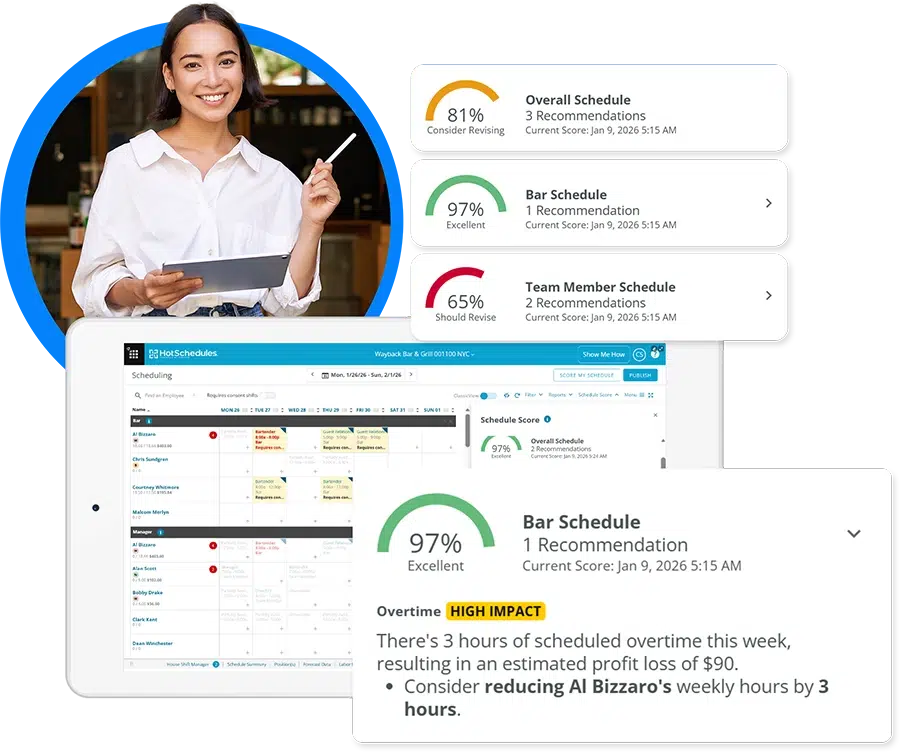
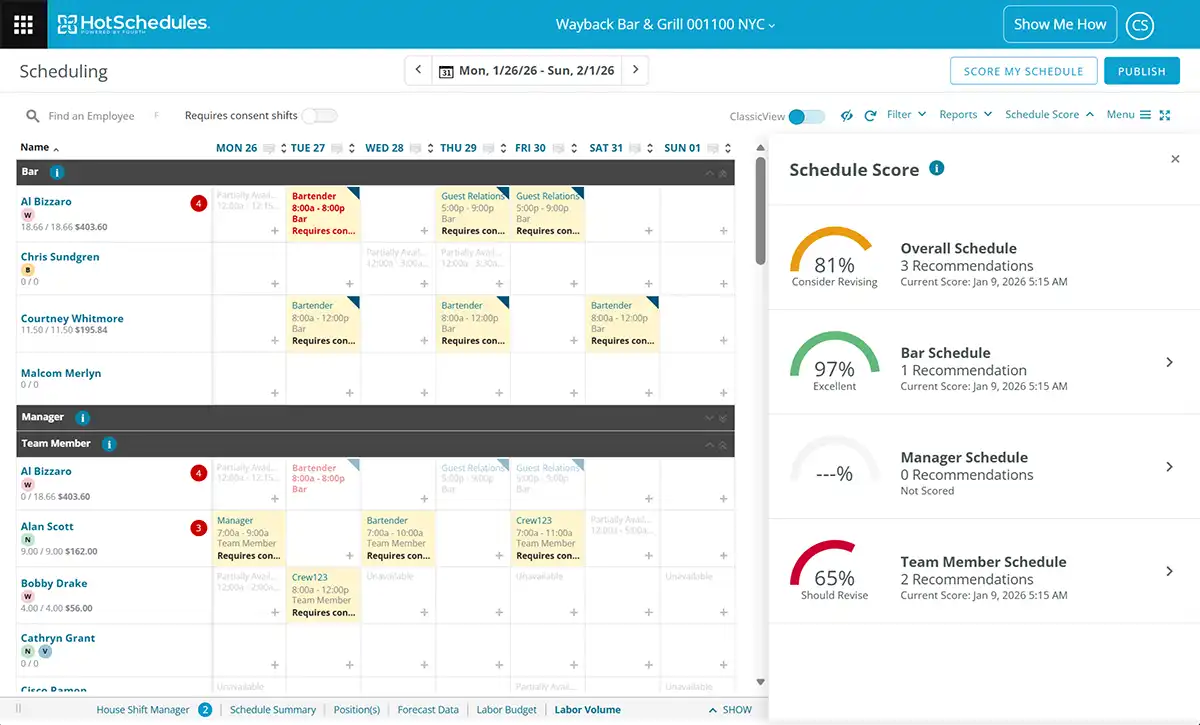
a restuarant manager using HotSchedules to check the schedule score


Why scoring schedules matters

Most scheduling problems aren’t dramatic, they’re incremental.

  • A few avoidable overtime shifts.
  • A schedule slightly misaligned to forecast.
  • Availability conflicts fixed too late.

Individually small. Collectively expensive.

Schedule Score turns those hidden issues into something managers can see, understand, and fix early: when changes are easy and impact is highest.


Why Schedule Score

schedule guidance

Guidance that shows up at the right moment

Learn more →

application consistency

Consistency without forcing uniformity

Learn more →

labor cost report

Reduce labor waste before it hits the P&L

Learn more →

manager workflow

Built into the way managers already work

Learn more →


What goes into the score

Schedule Score evaluates schedules using the priorities your organization defines, including:

  • Forecast vs. scheduled hours
  • Overtime risk
  • Employee availability
  • Minors and labor rules
  • Right to Rest, split shifts, and shift thresholds

The result: lower labor waste, fewer violations, and more predictable staffing across every location.

a man using a tablet to see his schedule scores in HotSchedules


Guidance that shows up at the right moment

As managers build or edit schedules, Schedule Score:

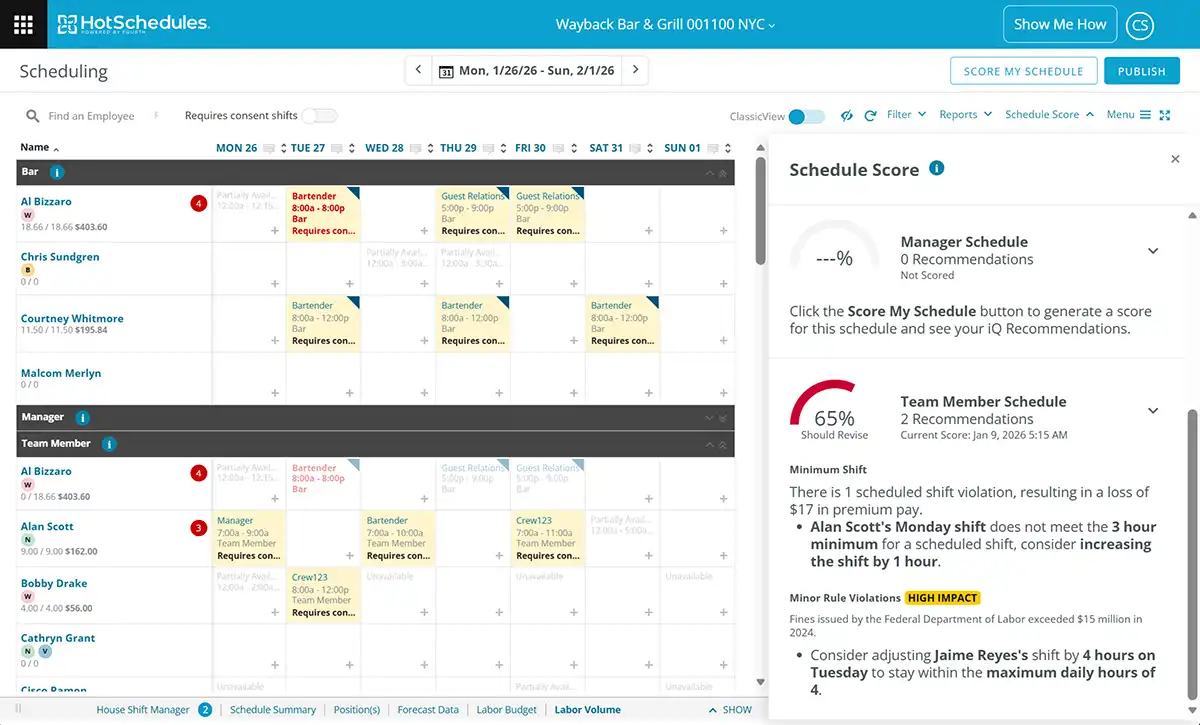
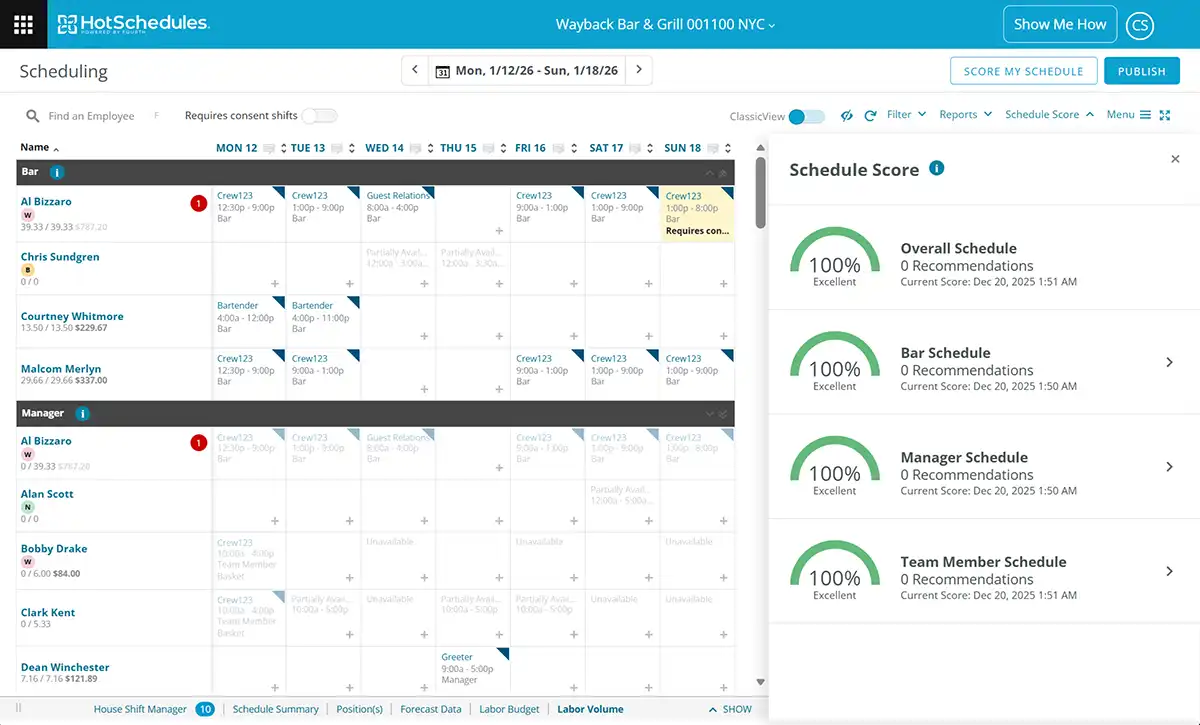
  • Calculates a color-coded quality score in seconds
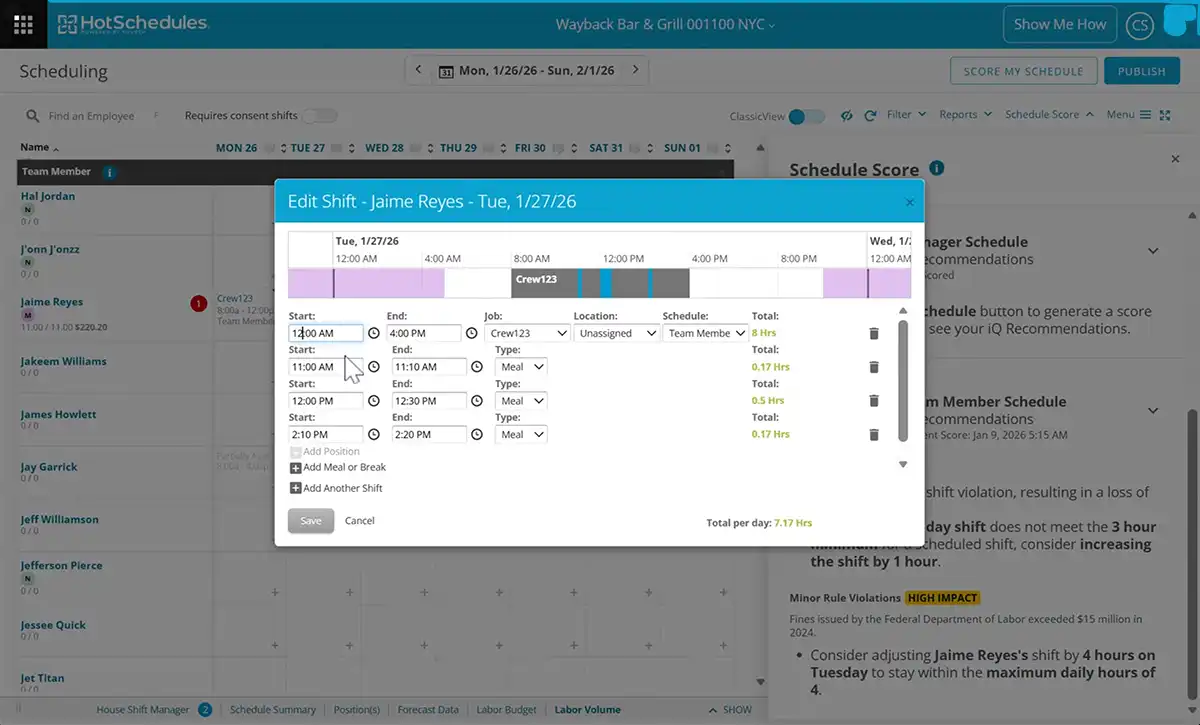
  • Flags high-impact issues affecting cost, coverage, or compliance
  • Explains why each issue matters, not just what to fix

Managers can adjust, rescore, and post.


Consistency without forcing uniformity

Schedule Score creates consistent scheduling standards, without forcing every store to follow the same rules.

  • Each location is scored against its assigned parameters
  • Different regions can support different labor policies
  • Operators guide behavior without blocking managers

That means higher scheduling quality everywhere—even in complex, multi-market operations.


Reduce labor waste before it hits the P&L

When labor rules and Labor Optimization are enabled, Schedule Score helps teams:

  • Prevent avoidable overtime
  • Improve alignment with forecasted demand
  • Surface compliance risks early, before they become costly

Better schedules upstream lead to better labor performance downstream.


Built into the way managers already work

  • Lives directly inside HotSchedules Scheduler
  • Score in-progress, current, or future schedules
  • Keep recommendations visible while making changes
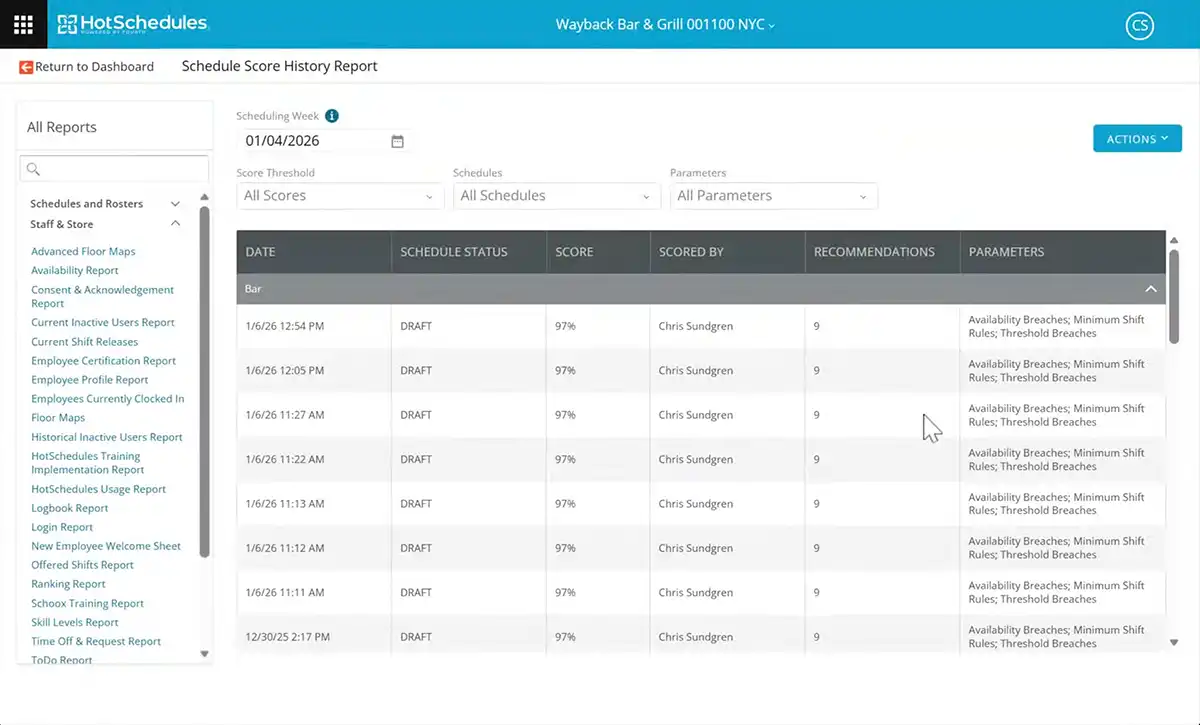
  • Track historical scores to measure improvement

No new tools. No extra steps.


Frequently Asked Questions

  • What is Schedule Score in HotSchedules?
    • Schedule Score is a feature built directly into HotSchedules Scheduler that evaluates the quality of a schedule before it’s posted. It scores schedules against labor demand, employee availability, and the operator’s configured rules — flagging high-impact issues so managers can fix them while changes are easy, before the schedule goes live.
  • When does Schedule Score evaluate a schedule?
    • Schedule Score runs as managers build or edit a schedule — not after the fact. It calculates a color-coded quality score in seconds, flags issues, and explains why each one matters. Managers can adjust, rescore, and post. It can also score in-progress, current, or future schedules.
  • What does the color-coded score mean?
    • The color-coded score is a visual quality indicator reflecting how well a schedule aligns with the operator’s defined priorities — including forecast alignment, overtime risk, availability conflicts, and labor rule compliance. The color gives managers an at-a-glance read on schedule health before posting, with accompanying flags that explain specific issues.
  • Does Schedule Score require a separate tool or login?
    • No. Schedule Score lives directly inside HotSchedules Scheduler — the same interface managers already use. No new tools, no extra steps, no separate login required.
  • What factors does Schedule Score evaluate?
    • Schedule Score evaluates schedules across five areas defined by the operator: forecast vs. scheduled hours, overtime risk, employee availability, minors and labor rules, and Right to Rest, split shifts, and shift thresholds.
  • How does Schedule Score help reduce labor costs?
    • Schedule Score surfaces labor waste before it reaches the P&L. By flagging avoidable overtime, forecast misalignment, and coverage issues before posting, managers can correct problems when the cost of change is zero. Better schedules upstream lead to better labor performance downstream.
  • What kinds of scheduling problems does Schedule Score catch that managers typically miss?
    • Three patterns that are individually small but collectively expensive: avoidable overtime shifts, schedules slightly misaligned to forecast, and availability conflicts identified too late. Schedule Score makes these hidden issues visible and quantifiable before they compound.
  • Can I track whether schedule quality is improving over time?
    • Yes. HotSchedules tracks historical scores, so operators and above-store leaders can measure whether scheduling quality is trending up or down across locations over time — turning it into a trackable operational metric rather than a subjective judgment.
  • How does Schedule Score work across multiple locations with different rules?
    • Each location is scored against its own assigned parameters, so operators can support different labor policies by region without a one-size-fits-all standard. Schedule Score delivers consistent scheduling quality across the estate while respecting differences between markets and regulatory environments.
  • Is Schedule Score designed for both small operators and large chains?
    • Yes. For smaller operators, it provides in-the-moment guidance for less experienced managers. For large multi-market chains, it delivers a consistent quality standard across all locations without requiring uniform rules — each location follows its own configured parameters.
  • Will managers need training to use Schedule Score?
    • Minimal. Schedule Score is embedded directly into the HotSchedules Scheduler managers already use daily — it appears as part of the scheduling workflow rather than a separate system. The color-coded score and plain-language issue explanations are designed to be self-explanatory in context.
  • How is Schedule Score different from just using Auto Schedule?
    • Auto Schedule automatically assigns employees to shifts based on availability, skills, and labor rules. Schedule Score is a quality check layer that evaluates a schedule — whether built manually, via Auto Schedule, or using a template — against demand alignment, cost risk, compliance, and availability. They’re complementary: Auto Schedule builds the schedule; Schedule Score validates and improves it before it goes live.

HotSchedules logo

Power your business with the best in the business.

See how the power of HotSchedules can simplify staffing and sales for happier teams and guests.