Employee Clocking System

Punch time has never been easier.

Say goodbye to payroll errors, compliance risk, and lengthy payroll processing sessions with employee clocking software from Fourth.

  • Validate punch edits easily with an intuitive interface.
  • Reduce compliance risk by avoiding sub-minimum wage payouts with built-in payroll compliance.
  • Expedite payroll by quickly and easily exporting data in your payroll system’s preferred format.

Punch time has never been easier.

  • Validate punch edits easily with an intuitive interface, while providing access to complete time attendance history.
  • Reduce risk by avoiding sub-minimum wage payouts for tipped and non-tipped employees with built-in payroll compliance.
  • Expedite payroll by quickly and easily exporting data in your payroll system’s preferred format.
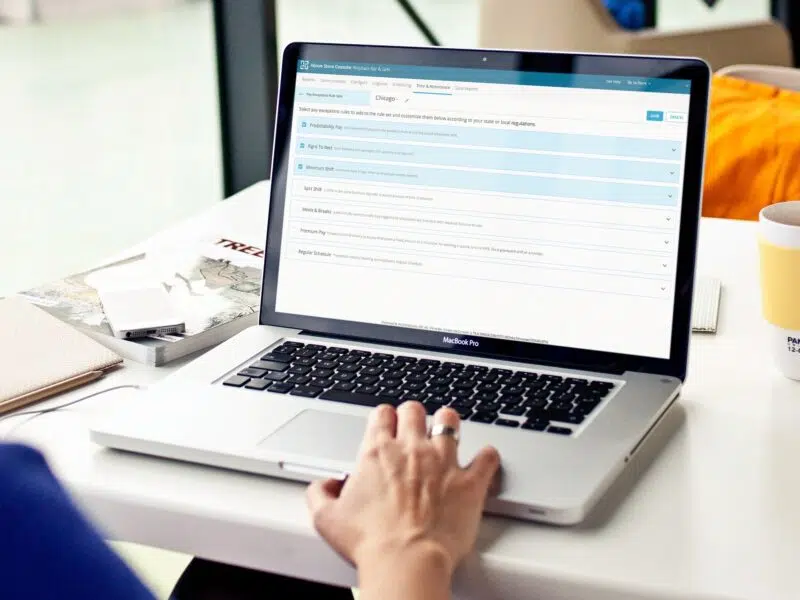
It’s time for control, accuracy, and visibility.

  • Maintain control of the labor budget by comparing scheduled to actual hours and avoiding overtime with timely alerts.
  • Reduce payroll errors and build trust with employee acknowledgment of punch edits at their next login.
  • Increase team member visibility to estimated pay, timecard history, and scheduled meals and breaks.

Keep Compliant and Carry On

Combining our labor, payroll software, onboarding, and applicant tracking software into one cloud-based solution helps payroll teams keep paychecks accurate while saving time and money.

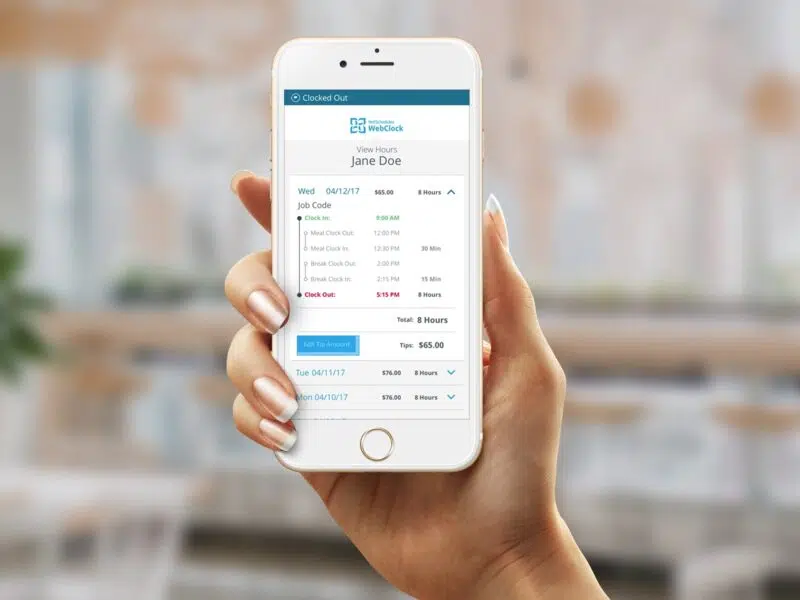
WebClock

Our employee time clocking software eliminates the need for expensive, outdated hardware and allows you to take advantage of valuable compliance features.

Be Certain with WebClock

  • Clock-in anywhere. Allow on-the-go employees to clock in from their phones.
  • Prevent time theft. Avert early clock-ins and “buddy punching” with geo-fencing boundaries.
  • Take quick action. Keep managers aware with push notifications for late clock-ins and missed meals or breaks.

“Our tour guides go straight to location. Thanks to WebClock, they clock in and out remotely. After the tours are finished, they can clock out on the spot and leave from downtown, which is more convenient for them.”

— Joey Robinson (Senior Vice President, Big Bus Tours)

See how Fourth’s WebClock became an integral part of Big Bus Tours business

Frequently Asked Questions

  • What is Fourth’s Time and Attendance solution?
    • Fourth’s Time and Attendance solution is a cloud-based employee clocking system that replaces paper timesheets and legacy hardware. It tracks employee punches, validates edits, enforces compliance rules, and exports data directly to payroll, all within the HotSchedules platform. The result: fewer payroll errors, reduced compliance risk, and faster payroll processing.
  • How does Time and Attendance connect to scheduling in HotSchedules?
    • Time and Attendance integrates directly with HotSchedules scheduling, allowing managers to compare scheduled hours against actual hours in real time. The integration enforces clock-in/clock-out times against the published schedule, triggers real-time overtime alerts, and provides a unified labor data view without toggling between systems.
  • What is WebClock and how does it work?
    • WebClock is Fourth’s browser-based employee clocking tool. Employees log their time through a web interface using a POS ID or their HotSchedules credentials — from any internet-connected device including phones, tablets, or a store computer. It captures punch data in real time, enforces geo-fencing boundaries, and pushes alerts to managers for late clock-ins and missed breaks.
  • Can employees clock in remotely or from off-site locations?
    • Yes. WebClock is built to support on-the-go and remote workers. Employees can clock in and out from their phones wherever they are — a capability Big Bus Tours relies on, with tour guides clocking in at remote locations and clocking out downtown when their tours finish, without returning to a central office.
  • What geo-fencing controls does WebClock offer?
    • WebClock supports geo-fencing boundaries that restrict when and where employees can clock in — preventing early clock-ins and buddy punching by requiring the device to be within a defined geographic boundary at the time of the punch.
  • What push notifications does WebClock send to managers?
    • WebClock sends managers real-time push notifications for late clock-ins and missed meals or breaks — so managers can take quick action during the shift rather than discovering a compliance issue after the fact during payroll review.
  • How does Fourth prevent buddy punching?
    • WebClock’s geo-fencing feature prevents buddy punching by requiring the device used to clock in to be physically within the configured location boundary at the time of the punch. An employee cannot clock in a colleague from a different location or off-site.
  • How does the system prevent early clock-ins?
    • Geo-fencing boundaries in WebClock can be configured to prevent employees from clocking in before their scheduled shift start — or outside the designated work location — eliminating unauthorized early punching that inflates labor hours without corresponding productivity.
  • How are punch edits handled to maintain trust and accuracy?
    • When a manager edits a punch record, the employee is notified and asked to acknowledge the change at their next login. This two-way visibility creates a transparent record of any adjustments, reduces the risk of unauthorized edits going unnoticed, and builds employee trust in the accuracy of their paychecks.
  • How does Fourth help prevent overtime?
    • The system provides timely overtime alerts when an employee is approaching or has exceeded overtime thresholds during a shift. Combined with the scheduled vs. actual hours comparison, managers have the information needed to reassign or release employees before overtime costs are locked in.

Our team would love to hear from you

Sales: +1 (877) 539-5156

Support: +1 (877) 720-8578