Key Takeaways
- Time & Attendance can allow employees to punch in and out of shifts from their mobile device, within a specified time and geo-fenced location.
- Managers receive alerts when punch times aren’t adhered to, allowing adjustments of work hours and monitoring of breaks.
- The app facilitates payroll management, comprehensive work reports, labor cost analysis, and tip adjustments, improving transparency and efficiency.
Transcripts
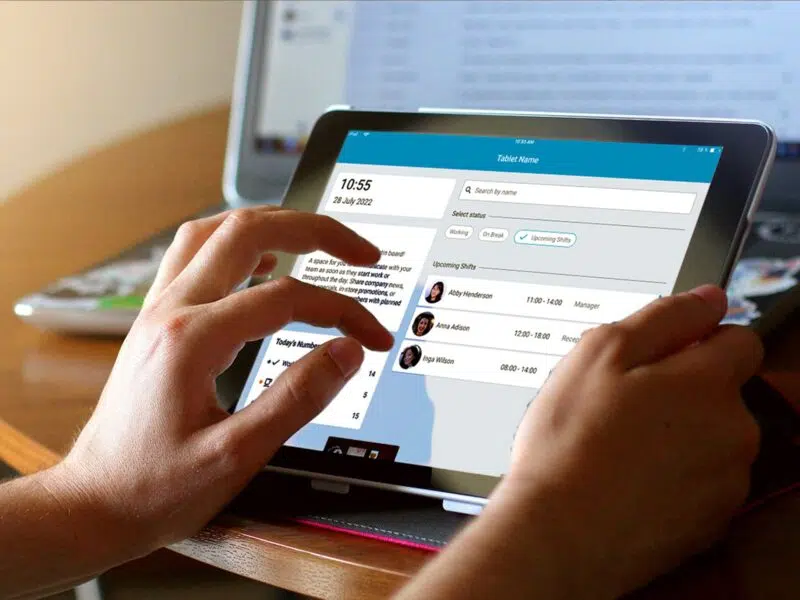
Making punch time adjustments is a hassle. It can lead to confusion for employees and loss of money for you. With Time & Attendance, you get full transparency and control. Employees can punch in right from their mobile device, provided it’s within 5 minutes of the shift’s start time and they’re within a geo-fenced radius of the store’s location.
When someone doesn’t punch in or out as expected, managers receive a notification on their phones. This ensures employees will never accidentally work through their breaks or forget to clock in or out. From the desktop app, managers can run reports, get a quick snapshot of who was scheduled along with their actual punch in and out times, and view over-under on labor projections. Making adjustments to things like tips and the tip pool further promote trust and transparency.
When it is finally time to run payroll, Time & Attendance streamlines your payroll process by zipping all your labor information into a neat file for your payroll platform.